
An AI agent completes tasks; a chatbot answers questions. In the AI agent vs chatbot comparison, that is the whole difference in one line. An AI agent plans the steps, uses tools in your other systems such as your CRM, email or database, checks its own results and asks a person to approve anything risky. A chatbot talks. Adding a language model to a chatbot makes it better at talking, but it does not turn it into an agent.
This guide explains the difference between AI agents and chatbots in plain terms, shows the same request handled both ways, covers the risks, and helps you decide which one your business needs. If you already know you need an agent, see our AI agent development service.
AI agent vs chatbot at a glance
- A chatbot answers questions inside a conversation and hands over to a person when it cannot help.
- An AI agent works towards a goal: it plans several steps, takes actions in connected systems and checks the result.
- Agentic AI is the broader term for systems that act towards a goal. In business use it mostly means the same as AI agents.
- A chatbot that is wrong gives a wrong answer. An AI agent that is wrong can take a wrong action, so agents need limits and approvals.
- Most teams should start with a chatbot or a RAG assistant for answers, and add agent actions once the answers are reliable.
What is the difference between an AI agent and a chatbot?
The difference between an AI agent and a chatbot is autonomy. A chatbot responds to what a user says, one reply at a time, and stays inside the conversation. An AI agent is given a goal, decides which steps are needed, acts through connected tools and keeps going until the task is done or it needs a person. The chatbot informs; the agent resolves.
What is a chatbot?
A chatbot is software that talks with a user and replies to what they ask. There are three common kinds, and they are often confused with agents:
- Rule-based chatbots follow fixed scripts and decision trees. They match keywords and return a prepared answer, such as opening hours or a tracking link.
- Language-model chatbots use a large language model, so they understand ordinary wording and write natural answers.
- Knowledge chatbots answer from your own documents using RAG, and show the source of each answer.
In all three, the job is the same: answer, inform and hand over. A chatbot can look up an order or create a ticket if someone has wired that action in advance, but it does not decide for itself what to do next.
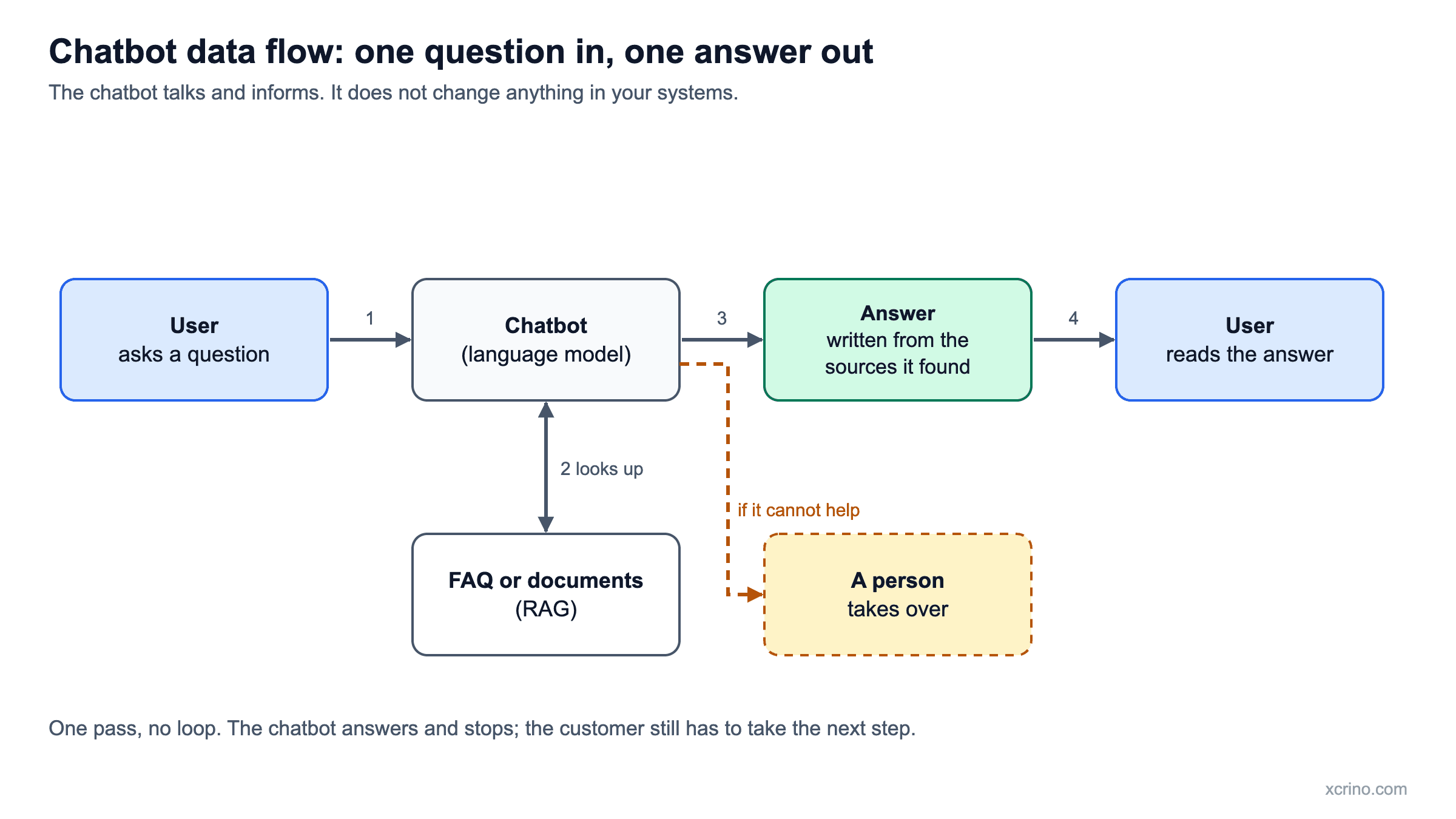
The diagram below shows how data moves through a typical chatbot: one question goes in, the chatbot checks its sources, and one answer comes out.
What is an AI agent?
An AI agent is software that pursues a goal across several steps. Given a task, it works out what is needed, takes actions in connected systems, looks at the result and decides what to do next. Most business AI agents have four parts:
- A model that plans. It works out which steps the task needs and in what order.
- Tools. The actions it is allowed to take, such as searching a database, updating a CRM record, sending an email or calling an API.
- Memory. The context it keeps across steps, so it does not lose track of the task or repeat itself.
- Guardrails. Limits on what it may do alone, with a person approving anything costly or hard to undo.
How does an AI agent work?
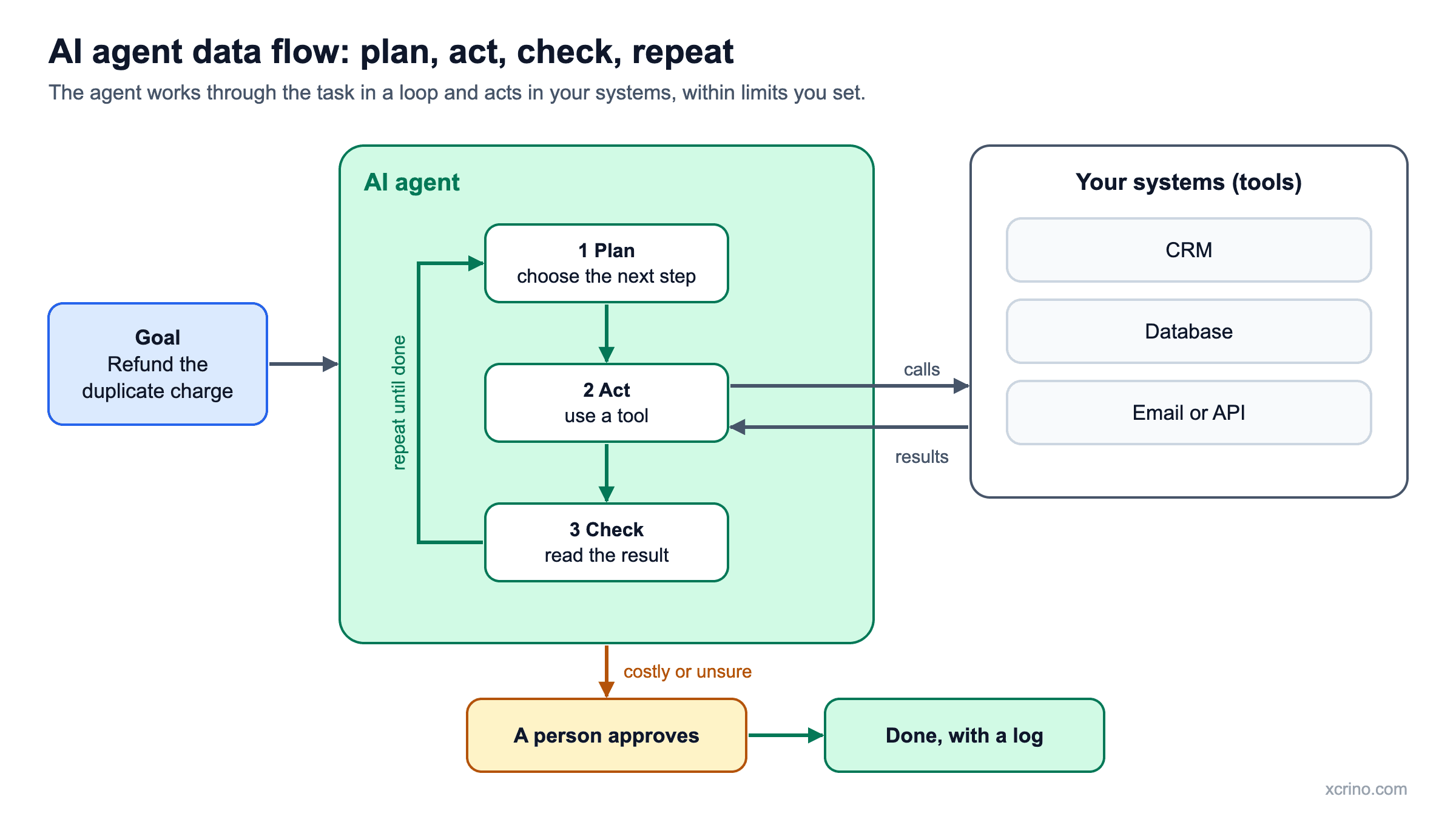
An AI agent works in a loop. It decides what to do, does it, looks at what happened and decides again, until the goal is met or it needs help. In practice the loop looks like this:
- Goal. The agent receives a task, for example "resolve this refund request".
- Plan. It breaks the task into steps, such as find the order, check the payment, check the refund rules.
- Act. It calls a tool to carry out the first step, for example a database lookup.
- Check. It reads the result and decides whether it matches what it expected.
- Decide. It continues to the next step, tries another approach, or stops and asks a person to approve or take over.
The loop is what separates an AI agent from a chatbot. A chatbot has one turn: question in, answer out. An agent keeps working through the task.
The diagram below shows the agent loop and how data moves between the agent, your systems and a person. Each pass through plan, act and check updates what the agent knows before the next step.
AI agent vs chatbot: the key differences
- Main job. A chatbot answers questions. An AI agent completes tasks.
- Steps. A chatbot handles one reply at a time. An agent plans and runs several steps in order.
- Systems. A chatbot usually works inside one channel and one knowledge source. An agent works across more than one system.
- Decisions. A chatbot follows a flow or answers within what it has been given. An agent chooses between tools, within permissions you set.
- Memory. A chatbot usually remembers only the current conversation. An agent tracks the state of the task across steps.
- Risk. A chatbot that is wrong gives a wrong answer. An agent that is wrong can issue the wrong refund or update the wrong record, which is why approvals and limits matter.
- Cost. Agents take more work to build and test, and cost more to run, because they plan, call tools and check results.
- Best for. Chatbots suit simple, repeatable questions. Agents suit multi-step work that people do by hand today.
What is agentic AI, and is it the same as an AI agent?
Agentic AI is the broader term for AI systems that act towards a goal rather than just reply. An AI agent is one such system. In everyday business use, the two terms are mostly used the same way, and some systems combine several agents that hand work to each other.
The useful question is not which label a product carries but whether it can independently finish a multi-step task that involves more than one system. If it cannot, it is a chatbot, however it is described.
The same request, handled both ways
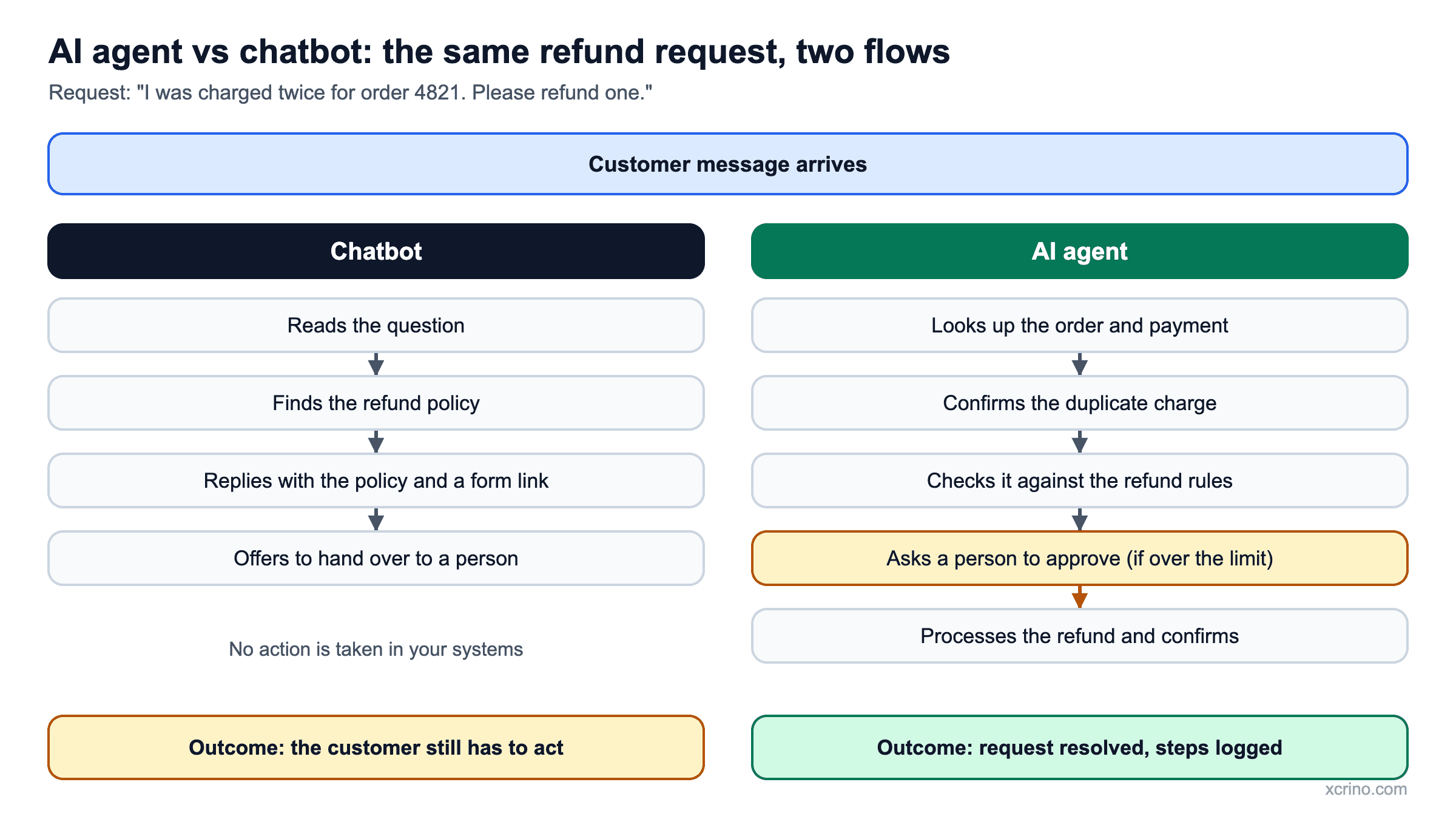
A customer writes: "I was charged twice for order 4821. Please refund one."
- A chatbot explains your refund policy, links to the refund form and offers to hand over to a person.
- An AI agent looks up the order and the payment record, confirms the double charge, checks it against your refund rules, asks a person to approve if the amount is above your limit, processes the refund, and sends the customer a confirmation.
The chatbot saved the customer a search. The agent resolved the request. A second example: a new enquiry arrives from your website form. A chatbot can thank the visitor and collect their details. An AI agent can check the company in your CRM, score the lead against your criteria, draft a reply for a salesperson to approve and book the follow-up task.
The diagram below puts the two side by side for the refund example: the same customer message, two very different flows and outcomes.
What can AI agents do for a business?
AI agents fit work that follows a pattern but needs judgement at each step. The most common business uses are:
- Customer support. Looking up orders, applying policies, drafting replies and processing simple requests with approval.
- Sales and marketing. Qualifying leads, enriching records, drafting outreach and scheduling follow-ups.
- Finance and back office. Checking invoices against orders, flagging mismatches and preparing entries for review.
- Operations. Monitoring stock or tickets, raising purchase requests and routing work to the right team.
- Reporting and analysis. Pulling data from several sources and preparing a summary for a person to review.
When is a chatbot enough?
A chatbot is enough when the goal is faster answers rather than automated actions. Choose a chatbot when:
- People mostly ask the same questions and the answers sit in your documents.
- You want fewer repeat tickets, not automated changes to your systems.
- The task is simple and predictable, such as opening hours, delivery policy, booking a slot or collecting lead details.
When do you need an AI agent?
You need an AI agent when the work involves looking something up, deciding and then acting across systems. Choose an agent when:
- A task takes several steps across systems, and people spend hours copying data between them.
- The work follows rules but has exceptions, such as refunds, order changes, lead qualification or invoice checks.
- You can define clear limits and approvals, and you can measure whether the agent got it right.
What are the risks of AI agents, and how do you control them?
The main risk of an AI agent is that it acts. A wrong answer from a chatbot can be corrected by the next message. A wrong action in a live system, such as a refund, a deleted record or an email to the wrong customer, is harder to undo. The risks are manageable with the right design:
- Give the minimum access. Let the agent use only the tools and data the task needs.
- Require approval for costly actions. Anything above a set value, or hard to reverse, goes to a person first.
- Log every step. A person should be able to see what the agent did and why.
- Set limits. Cap the number of steps, the spend and the actions per run.
- Test on real cases. Build a set of real requests with known correct outcomes and re-run it after every change.
- Keep a fallback. When the agent is unsure, it should stop and hand over, not guess.
How can you tell if a product is a real AI agent?
Many products are sold as "AI agents" but behave like chatbots. Ask three questions before you buy or build:
- Can it finish a multi-step task on its own across more than one system?
- Does it show what it did, so a person can check the steps afterwards?
- Does it stop and ask when it is unsure, and does it have clear limits on what it may do alone?
If the answer to the first question is no, you are looking at a chatbot, which may still be exactly what you need.
Analyst firm Gartner calls the relabelling of chatbots, assistants and robotic process automation as agents "agent washing", and in June 2025 estimated that only about 130 of the thousands of agentic AI vendors are real. The three questions above are a quick way to avoid paying for a chatbot sold as an agent.
AI agent vs chatbot for customer support
For customer support, a chatbot answers and an AI agent resolves. A chatbot suits questions with a fixed answer, such as delivery policy or opening hours. An AI agent suits requests that need action, such as a refund, an order change or a status check across systems.
- Use a chatbot for FAQs, policy questions and routing to the right team.
- Use an AI agent when the customer needs something done and the steps involve your order, payment or CRM systems.
- Combine them by keeping the chatbot as the front door and letting it pass resolvable requests to an agent, with a person approving costly actions.
AI agent vs RPA: what is the difference?
Robotic process automation (RPA) follows a fixed script, clicking through screens or moving data the same way every time. An AI agent decides its steps from the situation, so it can cope with variation such as a missing field or an unusual request. RPA is cheaper and more predictable for stable, identical tasks. An AI agent fits work where inputs vary and judgement is needed, and the two are often used together.
AI agent vs virtual assistant vs copilot
A virtual assistant handles personal requests such as reminders, searches and simple commands. A copilot works inside an application and suggests or drafts while a person stays in control and takes the action. An AI agent goes further: it carries out a multi-step task across systems, within limits you set. The more it acts on its own, the more it needs approvals and testing.
How do RAG, chatbots and AI agents fit together?
RAG is how an assistant answers from your own documents, with sources. It is the knowledge part. A chatbot is the conversation part. An AI agent adds the action part. Many agents use RAG to look up company knowledge before they act, so a real project often combines all three. Our guide to what RAG is explains the knowledge side in more detail.
How much does an AI agent cost, and how long does it take?
The cost depends on the number of steps, the systems the agent connects to, the risk of its actions and how much testing it needs. At Xcrino, the cheapest way to find out is a fixed-price AI proof of concept from $3,000 (about ₹2.7 lakh). It takes 2–4 weeks and ends in a clear go or no-go answer.
If the result is a go, a first production release typically takes 1–2 months and starts from $5,000 (about ₹4.5 lakh). For what drives the price of a larger build, read how much an AI agent costs to build.
How do you start with an AI agent in four steps?
- Pick one workflow. Choose a task that people repeat often and that has a clear right answer.
- Define success. Decide the numbers up front: accuracy, time saved and the cost you can accept per task.
- Start with approval. Let the agent prepare actions and have a person approve them. Widen its freedom only after it has earned trust on real work.
- Measure and expand. Review results on real cases, fix the weak spots, then add the next workflow.
If you have decided you need an agent, our step-by-step guide on how to build an AI agent covers the seven steps from choosing a workflow to launch.
For a single overview of agents, tests, build and cost, read AI agents for business: the complete guide.
Questions we are often asked
Is ChatGPT an AI agent?
ChatGPT is mainly a chat assistant. Any chat assistant starts behaving like an agent only when it is connected to tools and allowed to take actions on its own, so it depends on how it is set up.
Can we upgrade our chatbot into an AI agent?
Often, yes. You keep the conversation layer and add tools, permissions and approval steps. The harder part is not the chat; it is choosing safe actions and testing them against real cases.
Are AI agents better than chatbots?
Neither is better in general. Chatbots are simpler, cheaper and easier to control, and they are right for answering questions. AI agents are better for multi-step work across systems, and they need more care.
Are AI agents safe to use with customers?
They can be, if you limit what they may do. Start with actions that can be undone, require approval for anything costly, log every step and test on real cases before launch.
Should customer support start with a chatbot or an AI agent?
Most teams start with a chatbot that answers from their help centre, then add agent actions such as order lookups or refunds once the answers are reliable.
What is the difference between agentic AI and generative AI?
Generative AI creates content, such as text or images, when asked. Agentic AI uses that ability to pursue a goal: it plans, takes actions and checks results. Many AI agents are built on a generative model.
Is an AI agent better than a chatbot for a small business?
Not automatically. Most small businesses get the quickest return from a chatbot that answers common questions from their own content. An AI agent becomes worth it once a repeated task spans several systems and takes real staff time.
Will AI agents replace chatbots?
Not entirely. Chatbots remain the simplest way to answer questions. Many companies keep a chatbot as the conversation layer and add agent abilities behind it for tasks that need action.
Sources
About the author
This article was written by Ms Mubeshra Anjum of Xcrino Business Solutions. You can follow her work and connect with her on LinkedIn.