
To build an AI agent, pick one workflow, set clear success measures and limits, connect a language model to the data and tools it needs, add approval steps for risky actions, test it on real cases and launch it with monitoring. Most of the work is in the limits, the data and the testing, not in the model itself.
This guide walks through the seven steps in plain language for business teams. If you are not yet sure you need an agent rather than a simpler chatbot, read AI agent vs chatbot first. If you already know what you want built, see our AI agent development service.
How to build an AI agent at a glance
- Start with one workflow that people repeat often and that has a clear right answer.
- Decide success measures and limits before anyone writes code.
- Check that the data and tools the agent needs are available and clean enough.
- Build a plan, act, check loop with guardrails and a fallback to a person.
- Test on real cases, not demos, and re-run the tests after every change.
- Launch with approval on every action, then widen the agent's freedom as it earns trust.
What is an AI agent, and what is it made of?
An AI agent is software that pursues a goal across several steps, using tools in your systems and checking its own results. A business agent usually has four parts:
- A language model that plans the steps and decides what to do next.
- Tools it can call, such as a database lookup, a CRM update, an email or an API.
- Memory that keeps track of the task as it moves through the steps.
- Guardrails that limit what it may do alone and send risky actions to a person.
What can you build an AI agent for?
The best first agents handle work that follows rules but needs judgement at each step. Common examples are:
- Customer support: looking up orders, applying policies and processing simple requests with approval.
- Sales: qualifying leads, enriching CRM records and drafting follow-ups for a person to approve.
- Finance: checking invoices against orders and flagging mismatches for review.
- Operations: monitoring stock or tickets and raising requests to the right team.
- Reporting: pulling data from several systems and preparing a summary.
How do you build an AI agent, step by step?
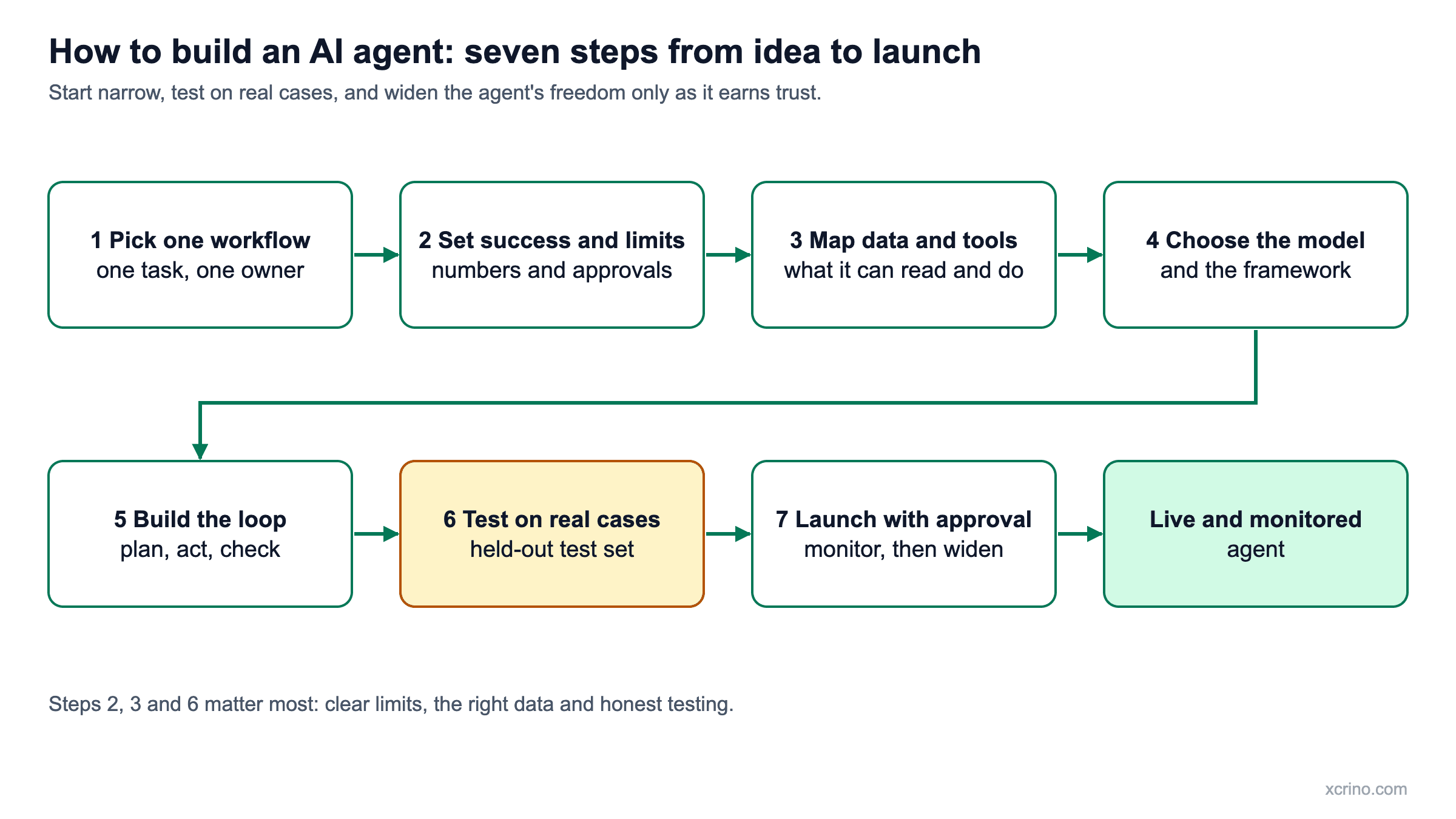
The diagram below shows the seven steps from idea to launch. The details of each step follow.
1. Pick one workflow
Choose a task that people repeat often, that takes several steps across systems, and that has a clear right answer. "Use AI in customer support" is too broad. "Process duplicate-charge refunds" is a workflow. Avoid tasks that happen rarely, or that must be exactly right every time with no human review.
2. Set success measures and limits
Decide in numbers what "good enough" means: how accurate the agent must be, how much time it should save per task and what each task may cost to run. Then set the limits: which actions it may take alone, which need approval, how much it may spend and how many steps it may take before it stops and hands over.
3. Map the data and tools
List every system the agent must read from or write to. Start with read-only access, then add write access one action at a time. Check the quality of the data it will rely on: missing fields and outdated records cause more failures than the model does. If the agent must answer from documents, add RAG so it can show its sources.
4. Choose the model and framework
Pick the model by testing two or three on your own real examples, not by reputation. Compare accuracy, speed, cost per task and where your data is processed. For a simple agent, plain code that calls the model and your tools is often enough. An agent framework becomes useful when you have several agents or a long, branching process.
5. Build the loop
The agent works in a loop: plan the next step, act through a tool, check the result, then continue, retry or stop. Give each tool a clear description and strict inputs. Set a limit on retries, and make the agent stop and hand over when it is unsure rather than guess. Keep memory to what the task needs.
6. Test on real cases
Build a test set of real requests with known correct outcomes, including awkward ones such as missing details or conflicting records. The number depends on the risk: more cases for actions that touch money or customers. Score both the final outcome and the steps taken, compare against how a person does the task today, and re-run the set after every change.
7. Launch with approval and monitor
Start with a person approving every action. Log each step so you can see what the agent did and why. Review failures regularly and watch the cost per task. When results are consistently good on real work, let the agent act alone on low-risk actions, and then move on to the next workflow.
A worked example: a refund agent
Take duplicate-charge refunds. The workflow is one task with a clear answer (step 1). Success means the right refunds are processed and the wrong ones are never issued, with approval for any amount above a set limit (step 2). The agent needs read access to orders and payments and write access to the refund action (step 3). It looks up the order, confirms the double charge, checks the refund rules, asks for approval if needed, then processes the refund (steps 4 and 5). It is tested on past refund requests, including ones that should be refused (step 6), and launched with approval on every refund (step 7).
What does a typical AI agent tech stack include?
The exact tools vary, but most business agents combine the same layers:
- A language model from a model provider, accessed through an API.
- Orchestration code that runs the plan, act and check loop and calls the tools.
- Integrations with your CRM, database, email or payment systems through their APIs.
- A knowledge layer such as a vector database, if the agent answers from documents.
- Logging and monitoring that record every step, cost and failure.
- An approval interface where a person reviews actions that need sign-off.
How do you keep an AI agent secure?
Treat an agent like a new employee with system access: give it the minimum it needs and watch what it does. In practice that means:
- Least privilege. Separate read and write access, and grant each only where the task needs it.
- Approval for high-impact actions. Anything costly, hard to undo or customer-facing goes to a person first.
- Safe handling of inputs. Treat text from emails, web pages and documents as data, not as instructions the agent must follow.
- Clear data rules. Agree where data is stored and processed before the build starts.
- A full audit trail. Log every tool call so any action can be explained and reversed.
How do you measure whether an AI agent is working?
Use the success measures from step 2 and track them on real work after launch:
- Task success rate: how often the agent reaches the correct outcome.
- Escalation rate: how often it hands over to a person, and whether those handovers were right.
- Time and cost per task: compared with how the task was done before.
- Error cost: the number and impact of wrong actions, including ones a person caught.
If the success rate drops or errors rise, tighten the limits and return to approval on every action before widening again.
How do you build an AI agent for customer support?
Start with the requests that are most frequent and have a clear policy, such as order status, duplicate charges and address changes. Give the agent read access to orders and your help-centre content, then add one action at a time, such as a refund, with approval above a set value.
- Answer first. Use RAG so the agent answers from your help centre and shows the source.
- Act second. Add order lookups, then low-value refunds, then changes to orders.
- Hand over cleanly. When the agent is unsure, it passes the conversation to a person with a summary of what it found.
- Test on past tickets, including ones that should be refused.
How do you build an AI agent with Python?
In Python, a basic AI agent is a loop: send the task and the list of available tools to a language model, run the tool it chooses, return the result and repeat until the model says it is finished or a limit is reached. Most model providers offer Python libraries for this, and agent frameworks add structure when the process grows. The loop is the easy part. The limits, the tests and the approval steps decide whether the agent is safe to use.
How do you build an AI agent on a small budget?
Keep the scope to one narrow workflow, use the simplest tooling that works and test the idea before building a full system. A small proof of concept shows accuracy and running cost on your real data first. At Xcrino, a fixed-price AI proof of concept starts from $3,000 (about ₹2.7 lakh). Avoid building a general platform before one agent has proved its value.
What is a multi-agent system, and do you need one?
A multi-agent system uses several agents with narrow roles that hand work to each other, for example one that gathers information, one that drafts a reply and one that checks it. Most first projects do not need one. Start with a single agent, and split it into several only when its instructions or tools become too crowded to test reliably.
What skills and team do you need?
- An AI or software engineer to build the loop, connect the tools and run the tests.
- Someone who knows the process and can say what the right answer is.
- A person who owns access and security, so the agent gets the minimum permissions it needs.
- A reviewer who checks the agent's work in the first weeks after launch.
Can you build an AI agent without coding?
For a narrow, low-risk task, yes. No-code automation tools let you connect a model to common apps without writing code. The limits appear when the agent touches custom or older systems, handles money or customer data, or needs proper testing and approval steps. At that point you need engineering support.
What are the most common mistakes when building an AI agent?
- Starting too broad. A vague goal cannot be tested, so nobody can say whether it works.
- Skipping success measures. Without numbers, every result becomes a matter of opinion.
- Giving full access on day one. Start read-only and add write access slowly.
- Testing on demos. Hand-picked examples hide the cases that fail.
- Launching without approvals or logs. You lose trust the first time the agent acts wrongly and nobody can see why.
The stakes are real. Gartner predicted in June 2025 that over 40% of agentic AI projects will be canceled by the end of 2027 because of escalating costs, unclear business value or inadequate risk controls. Clear success measures, a fixed-price proof of concept and approvals from day one address each of those causes.
How long does it take, and what does it cost?
Timing and cost depend on the number of steps, the systems involved and how risky the actions are. At Xcrino, a fixed-price AI proof of concept starts from $3,000 (about ₹2.7 lakh) and usually takes 2–4 weeks. If the result is a go, a first production release typically takes 1–2 months and starts from $5,000 (about ₹4.5 lakh). For what drives the price of larger builds, read how much an AI agent costs. To test an idea cheaply first, see how to run an AI proof of concept.
Should you build in-house or hire a partner?
Build in-house if you already have engineers who have shipped AI features and can test and maintain an agent. Hire a partner if you do not, or if you want the agent tested properly before it touches live systems. Our founder and AI lead, Dr Sunil Gupta, reviews whether your data can support the use case before any build starts.
If you decide to add engineers to your own team, see how to hire dedicated developers without slowing delivery.
For the wider picture before and after the build, see AI agents for business: the complete guide.
Questions we are often asked
How long does it take to build an AI agent?
A focused proof of concept usually takes 2–4 weeks. A first production release typically takes 1–2 months. Larger agents that connect to many systems take longer.
Do I need RAG to build an AI agent?
Only if the agent must answer from your documents. Agents that work from structured data and tools, such as order and payment records, may not need it. Many agents use both.
Which language model should I use?
Test two or three on your own real examples and compare accuracy, speed, cost and where your data is processed. The best choice depends on the task, so avoid choosing by reputation alone.
How do I test an AI agent?
Build a test set of real requests with known correct outcomes, include awkward cases, score the outcome and the steps, and re-run it after every change.
Is it safe to let an AI agent act on its own?
It can be, within limits. Start with a person approving every action, log every step, and allow autonomy only for low-risk actions once the results are consistently good.
Can a small business build an AI agent?
Yes. Start with one narrow workflow and a small proof of concept. A small, well-tested agent is more useful than a broad one that nobody trusts.
What is the difference between an AI agent and a chatbot?
A chatbot answers questions; an AI agent completes tasks across systems. Our guide to AI agent vs chatbot explains the difference with diagrams.
Can I build an AI agent with ChatGPT?
You can use ChatGPT-style models as the language model inside an agent, and simple agents can be set up in some chat products. A business agent that touches your systems also needs integrations, limits, approvals and testing, which are built around the model.
What is an AI agent framework?
A framework is a library that provides the plumbing for the agent loop: calling the model, running tools, keeping memory and handling errors. It saves time on larger projects, but a simple agent can be written in plain code.
How much does it cost to build an AI agent from scratch?
It depends on the number of steps, the systems involved and the risk of the actions. Our guide to how much an AI agent costs explains what drives the price.
Do I need a vector database to build an AI agent?
Only if the agent searches your documents by meaning. Agents that work with structured data through tools, such as order and payment records, usually do not need one.