

Buy SaaS when a well-known product covers your workflow with light configuration. Build custom software when the gaps are expensive, frequent, or tied to how you compete. Most businesses we meet need neither extreme: they need a good SaaS core and a small amount of custom work around it.
Most teams do not need custom software on day one. They need a clear workflow, a tool that fits most of it, and a plan for the part that does not fit. The mistake we see most often is not choosing the wrong option. It is choosing before anyone has written down how the work actually gets done.
Start with the workflow, not the stack
Write down the steps a person takes to finish one job, from the request coming in to the job being closed. Include the spreadsheets, WhatsApp messages and copy-pasting that nobody likes to admit to. This takes an afternoon and saves months.
Then hold each SaaS candidate up against that list. If a product covers the steps with configuration, buy it. If it covers 80% and the remaining 20% is a weekly export, live with it for now. Custom work should wait until the gaps cost real money or slow down how you win business.
When SaaS is the better choice
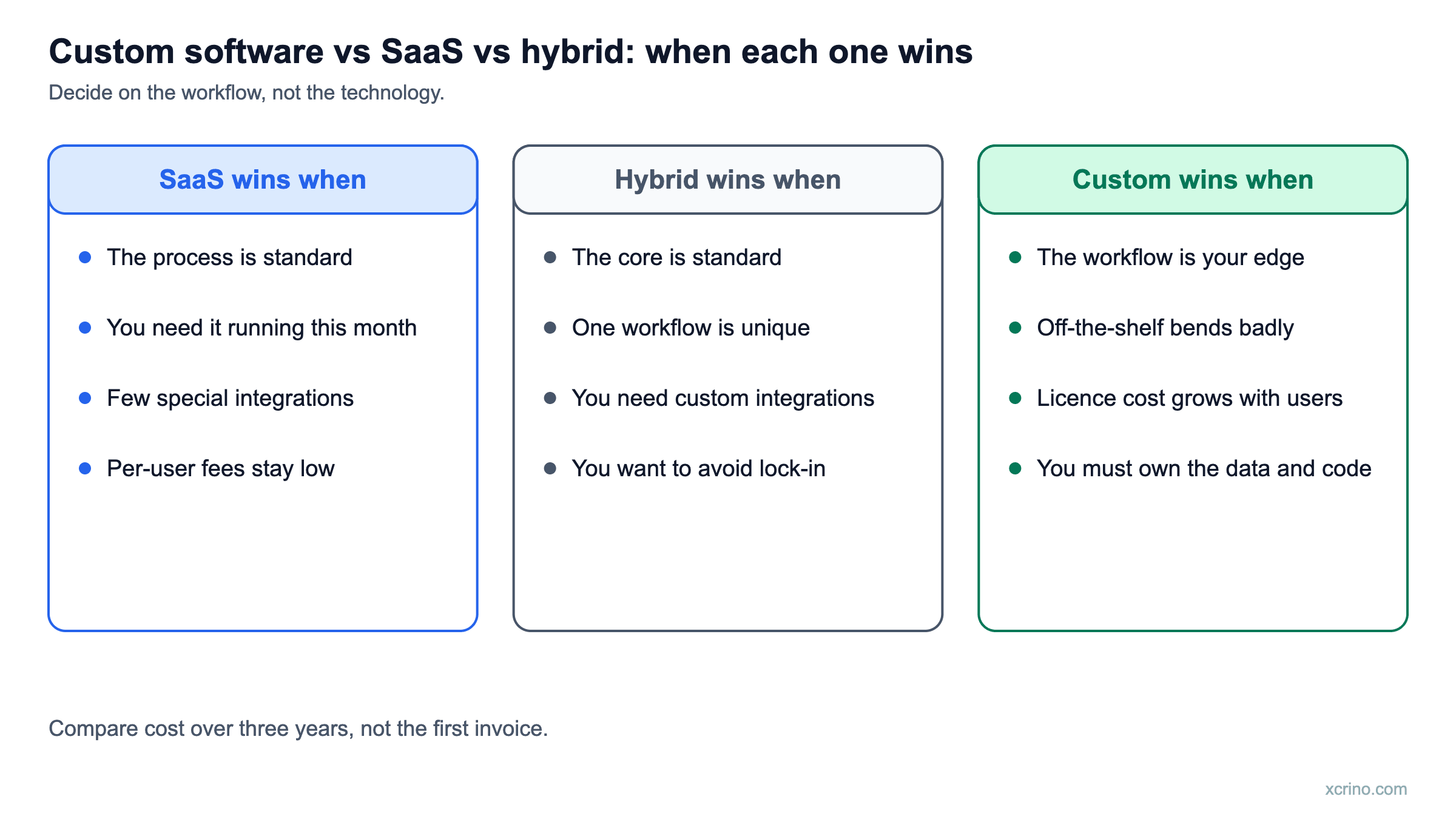
- Your process is standard. Accounting, payroll, email marketing and basic CRM work much the same in most companies. Someone has already built a good product for it.
- You need it running this month. A SaaS tool can be live in days. A custom build takes weeks at best.
- You don't have anyone to own the software. Custom software needs a product owner on your side who makes decisions, even if a partner writes the code.
- The cost of the gaps is small. If the workaround takes one person 30 minutes a week, a custom build won't pay for itself.
Signals that custom software is worth it
- You pay for three tools and still export CSV files between them every week.
- Your pricing, compliance or inventory rules are unusual enough that SaaS workarounds keep breaking.
- Per-user SaaS fees have grown faster than the value you get, and you are paying for features nobody uses.
- Your data sits in a vendor's system and you can't report on it the way the business needs.
- The software is the product: it is what customers pay you for, not a back-office process.
One of these on its own rarely justifies a build. Two or three together usually do.
Compare the cost over three years, not the first invoice
SaaS looks cheaper at the start because you pay monthly. Custom software looks expensive because the build is paid upfront. The fair comparison is total cost over about three years:
- SaaS: subscription fees for every user, add-ons, integration tools, and the staff time spent on workarounds.
- Custom: the build, hosting, and ongoing maintenance and improvements, which usually run every year after launch.
The answer is often a mix. A common example is keeping your accounting software but replacing the spreadsheets around it with a custom order and inventory system that syncs to it.
The hybrid option most teams overlook
You don't have to replace everything. Three middle paths work well:
- Integrate. Connect the tools you already use so data moves automatically. This removes most of the copy-paste.
- Extend. Build a small custom app for the one process the SaaS handles badly, and keep the SaaS for the rest.
- Replace in stages. Start with the module that hurts most, prove it with real users, then decide on the next one.
This is how our custom software development projects usually start: one focused first release, not a big-bang rewrite.
What to bring to a discovery call
A one-page workflow, the list of systems that must stay, a rough number of users and records, and an honest timeline that names the decision-makers. That is enough for a scoped proposal instead of a vague estimate. If you are moving data out of an old system, bring a sample export too; data migration is where many projects lose time.
Weighing AI features in the decision? See where AI belongs in a product. If you decide to build, our guide to hiring dedicated developers covers how to set up the team.
A three-year cost comparison you can fill in
The first invoice is the wrong number to compare. Add up everything for three years on each side:
- SaaS: licence fee per user per month × users × 36 months, plus set-up, integrations, extra modules, training and the cost of working around missing features.
- Custom: build cost, plus hosting, maintenance and improvements over the same 36 months, plus the cost of ongoing product ownership.
- Both: migration in, and the cost of leaving, which for SaaS means exporting your data and retraining the team.
SaaS usually wins in the first year. Custom can win by year three if licence cost grows with your headcount or if you pay repeatedly to work around features you need.
The diagram below summarises when each option tends to win.
Ten questions to decide
- Is this process the same as most companies' versions of it?
- Would a competitor be able to copy our advantage by buying the same tool?
- How many people will use it in year one and in year three?
- How many other systems must it connect to, and are there ready integrations?
- Who owns the data, and can we export all of it?
- What happens to our price if the vendor changes terms?
- How much of our workflow would we have to change to fit the tool?
- Do we need audit trails or controls that the tool lacks?
- How fast do we need it live?
- Who will maintain it in three years?
Mostly "yes, standard" answers point to SaaS. Mostly "no, and it is our edge" answers point to custom software. A split points to the hybrid option.
Three situations, three answers
- Payroll and standard accounting: buy SaaS. The process is the same for most companies and the vendor maintains compliance changes.
- A workflow that is your competitive edge: build custom. It is where off-the-shelf tools bend worst and where owning the logic matters most.
- A standard core with one unusual workflow: go hybrid. Keep the SaaS product and build the custom piece around it through its integrations.
For an example of the custom route, see our custom ERP case study for a chemical manufacturer's UAE operations.
What are the risks of each option?
- SaaS: price rises, features changing under you, data locked in a format you cannot easily leave, and limited control over security and uptime.
- Custom: a larger upfront cost, scope creep, and dependence on the team that built it unless the code and documentation are handed over properly.
- Hybrid: the integration layer becomes a product of its own and needs an owner.
How can you test the decision cheaply?
Before committing, run a short discovery or a small proof of concept on the one workflow where you suspect SaaS will not fit. If the tool handles it with minor changes, buy it. If you keep hitting walls, you have evidence for building. For AI features specifically, see where AI belongs in a product. If you decide to build, our guide to hiring dedicated developers covers how to set up the team.
Questions we are often asked
Is custom software always more expensive than SaaS?
Not over the full life of the system. Custom costs more upfront, but there are no per-user fees, and you only build what you use. For a growing team on an expensive SaaS plan, custom software can cost less within a few years.
Who owns custom software after it is built?
You should. At Xcrino, all source code and IP transfer to the client on full payment. Check this in any contract before you sign.
Can AI change the build-or-buy decision?
Sometimes. Many SaaS products now include AI features. If you need AI that works on your own data, such as search over your documents or forecasting from your sales history, a custom build or a small AI proof of concept is often the faster route.